Inmigreat: USCIS Case Tracker
- 4.9
- Rating
- 100.00K
- Installs
- Free
- Price

 Analysis by App-foxy
Keeping track of an immigration case is rarely a one-person task. A spouse may receive the mail, a parent may know the receipt number, and another family member may be the one checking a phone during the day. That is where Inmigreat: USCIS Case Tracker feels useful: it turns case follow-up into something easier to organize on a shared device without pretending to replace official immigration guidance.
I reviewed it as a tools app from Inmigreat LLC, focusing on the practical question many households have: can it make case monitoring less stressful when several people need the same information? My answer is yes, with an important condition. It works best as a convenient tracking layer around your USCIS or EOIR case, not as the only place you keep documents, deadlines, or legal advice.
The app is free to install and is rated for Everyone, which makes it approachable for a household with different ages using the same phone. Its store presence is also substantial, with over 100 thousand installs and a 4.9 average from around 4.8 thousand ratings. Those figures suggest that the basic idea is connecting with users, but my recommendation comes more from how the workflow fits real family routines than from the numbers alone.
You May Also Like

 Blood Strike: 2.5 Anniversary
Blood Strike’s Loadouts Turn Every Drop Into a Tactical Gamble
A close look at Blood Strike’s custom loadouts: how fast access to signature weapons reshapes its battle royale rhythm, rewards preparation, and narrows the gap between fights.

 Pandora - Music & Podcasts
Pandora’s Music Is Easy to Start, but Harder to Recover
Pandora’s strength is its low-effort path from a seed to a station. Its weak spot is how much confidence it asks you to place in connection, setup, and quiet recovery.

 8 Ball Pool
 Is Built on Rivalries, Rematches, and Routine
A close look at the rivalries, rematches, shared routines, and unanswered safety questions that turn a quick pool match into a persistent mobile community.

 Samsung Music
’s Quiet Strength Is Playing What You Already Own
Its reach comes less from spectacle than from dependable access to a personal library. That simplicity is both the app’s strongest retention engine and its ceiling.

 AccuWeather: Weather Radar
AccuWeather Review: A Quick, Clear Forecast for Everyday Decisions
For everyday plans, the best forecast is the one you can understand quickly. AccuWeather makes rain timing, radar, and local conditions easy to act on, with a few trade-offs.

 Hill Climb Racing
Why Hill Climb Racing Still Turns Crashes Into One More Run
A tiny car, a bumpy hill and one more upgrade: Hill Climb Racing keeps resurfacing because its simple chaos makes every near-miss feel personal.
More From Our News Desk



How it fits a shared household routine
A realistic example is a couple waiting on a case while one person works long shifts and the other handles most phone tasks. Instead of asking, “Did anything change?” every evening, the person who normally checks the case can use the tracker and share the relevant update verbally with the other person. That small change matters because it replaces repeated manual checking with a more deliberate routine.
I would also use it when a parent is helping an adult child, or when a trusted relative is assisting someone who is less comfortable with English or smartphone settings. The app’s value is not that it magically explains every immigration decision. Its value is that it gives the household a focused place to watch case movement and think about what needs attention next.
Shared-device use requires a little discipline. I would not leave the phone unlocked with sensitive case information visible in a public place, and I would avoid treating a family member’s quick glance as permission to manage everything. The app can support coordination, but the people involved still need to agree on who checks, who communicates, and who keeps the official paperwork.
That distinction is especially important when several cases exist in the same household. A spouse’s application, a child’s case, and a relative’s court matter should not be mentally blended together. Before relying on any update, I would say the applicant’s name and receipt or case reference out loud, then match it against the correct documents. This simple habit prevents the kind of confusion that no tracker can completely solve.
What the app is actually good at
The central benefit is monitoring. Inmigreat brings attention to USCIS and EOIR case progress, status alerts, personal statistics, and a sense of where a case stands in line. That combination is more useful than a bare page that only shows a status label, because waiting becomes easier to understand when you can look at movement and context rather than repeatedly refreshing without a plan.
I particularly like the idea of using the “place in line” view as a conversation aid. It can help a household discuss whether to keep waiting, gather questions for a lawyer, or check that all notices are being saved. It does not turn an estimate into a promise, and I would never use it to predict an exact decision date. Still, it gives the waiting period a clearer shape.
The personal statistics can also help users notice patterns in their own case history. For example, someone might compare how long different stages have taken or identify which case belongs to which applicant. The useful insight is not the number itself; it is the habit of recording what happened and when. That makes later conversations with an attorney or accredited representative more organized.
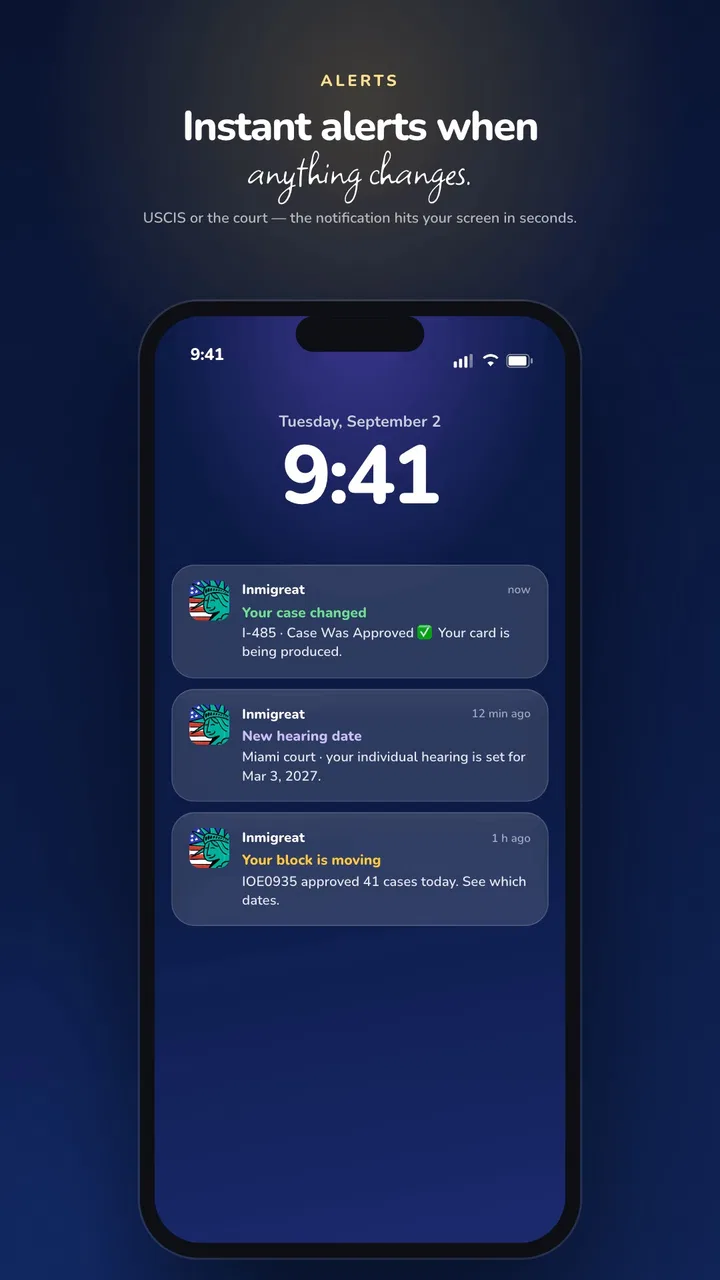
Alerts are another practical reason to keep the app available. A notification can prompt a user to open the case, verify what changed, and compare it with saved official notices. I treat an alert as a reminder to investigate, not as the final interpretation of a legal event. That extra verification step is essential when a household is making plans around work, travel, school, or appointments.
Setting it up without crossing personal boundaries
On a shared phone, setup should begin with ownership rather than speed. The person whose case is being monitored should know what information is entered and why. If a spouse or relative performs the setup, I would have the applicant present, review each case carefully, and decide together where notifications may appear. A convenient tracker should not quietly become a source of unnecessary exposure.
I would also keep the app’s role narrow. Use it to follow a case, while storing passports, notices, forms, and attorney correspondence in a separate secure place. This separation is one of my strongest recommendations because it avoids a common mistake: assuming that a status-tracking tool is a complete case-management archive.
When adding more than one case, pause after each entry and label the situation mentally by applicant and agency. USCIS and EOIR are not interchangeable contexts. A household may deal with both, but the meaning of an update can depend heavily on which system and proceeding it belongs to. The app can bring them into one monitoring routine; it cannot remove the need to understand that distinction.
Another useful boundary is deciding who receives alerts. If a phone is used by children, roommates, or guests, a visible notification may reveal more than intended. I would review the device’s notification behavior and avoid assuming that everyone holding the phone should see case details. This is not a criticism of the tracker specifically; it is a practical consequence of using any personal-status app on a shared device.
There is also a financial boundary worth mentioning. The app is free, but it includes optional in-app purchases ranging from $3.99 to $349.99 per item. I would not purchase anything simply because a family member is anxious about waiting. First, understand what the paid option provides, whether it is needed for your particular workflow, and whether the free experience already covers the monitoring you require. A worried household is exactly where careful purchasing matters most.
Coordinating updates across several people
Inmigreat is most helpful when a household creates a simple communication rule around it. I would choose one primary checker, one backup person, and a shared place for official notices. The app can provide the prompt, while the household decides how to confirm and communicate the information. That arrangement reduces duplicate checking and prevents three people from interpreting the same alert in three different ways.
A good routine is to check an alert, note the date, read the full status, and then compare it with the applicant’s documents. If the change seems important, tell the applicant directly rather than relying on a group message that may be missed. For a family member who is not confident with technology, a short explanation in plain language is more useful than forwarding a screenshot without context.
I would avoid making the app the family’s only memory. A small written log can record when an alert arrived, what the official account showed, and whether someone contacted a professional. This is one of the less obvious ways to get more value from the tracker: use it to trigger a repeatable process, not to replace your process. The app reduces friction, while the household log preserves continuity.
This approach is particularly useful when the person checking the phone is not the applicant. A relative may notice the alert first, but the applicant should remain central to decisions and document handling. If a lawyer or accredited representative is involved, the household should direct legal questions to that professional instead of asking the tracker to interpret a complicated notice.
The “own stats” element may also help during family coordination, but I would treat it as a personal overview rather than a universal benchmark. Cases differ, and two people waiting in the same home may have completely different circumstances. Comparing them too aggressively can increase anxiety. Used calmly, the statistics can organize questions; used competitively, they can create false expectations.
Age, trust, and the right level of access
The Everyone rating makes the app suitable for a broad audience in the ordinary app-store sense, but that does not mean every child should manage an adult’s immigration case. A teenager might help open a notification or read a general update to a parent, yet sensitive details and decisions should stay with the applicant or a trusted adult.
For older relatives, the app may be easier than repeatedly navigating a government website, especially when they only need a quick view of whether something has changed. I would still sit with them during the first use, explain what an alert means, and make sure they know that a notification is not automatically a request to pay money, submit a form, or contact an unknown person.
Trust also matters between adults. If a spouse manages the phone, both partners should agree on what is being monitored and how information is shared. A tracker can improve cooperation, but it should not become a way to inspect someone’s private case activity without their knowledge. Household convenience is valuable only when it respects the applicant’s control over personal information.
For a shared family phone, I would use a screen lock, keep the device updated, and avoid discussing case details in notification previews when other people may see the screen. These are everyday precautions rather than special app functions, but they determine whether a convenient monitoring tool feels safe in practice.
Users should also remember that a simple interface can hide complicated real-world consequences. A status may look reassuring while a notice contains an important deadline, or a change may require professional interpretation. I appreciate Inmigreat as a way to notice movement, but I would skip relying on it alone if my situation involved urgent court action, a confusing notice, or a deadline I did not understand.
Where it beats ordinary checking—and where it does not
The usual alternative is visiting an official case-status page whenever anxiety rises. That route remains important because official sources should be the final reference, but repeated manual checking is easy to forget and difficult to coordinate across a household. Inmigreat’s alerts and personal overview make the waiting process more structured, especially for people managing several responsibilities at once.
A spreadsheet is another alternative. Spreadsheets are excellent for recording dates, applicants, document names, and conversations, but they usually do not provide the same focused case-monitoring experience. I would use a spreadsheet or notebook alongside the app rather than choosing one over the other. The tracker watches for movement; the separate record explains what the household did afterward.
Legal-service platforms can be a better choice for someone who needs document preparation, attorney communication, or detailed case strategy. Inmigreat is not the option I would choose as a substitute for those services. Its strength is visibility and organization, not professional representation. That difference should guide expectations before anyone pays for an optional feature.
The current version is 2.3.53, and the app supports Android 7.0 or later. That makes it accessible on many older Android phones, which is helpful for families sharing an affordable or hand-me-down device. Still, users on an older phone should pay attention to normal notification behavior and storage settings, since a tracker is only useful if alerts can actually reach the person responsible for checking them.
One limitation I felt most clearly is psychological rather than technical: more visibility can sometimes encourage more checking. If a household opens the app every hour, the convenience becomes another source of stress. I recommend setting a reasonable checking rhythm and allowing alerts to do their job. The best workflow is not the one with the most screen time; it is the one that keeps everyone informed without making the case dominate the day.
My household verdict
After using it as a case-monitoring tool, I see Inmigreat as a practical companion for applicants and families who want a clearer routine around USCIS or EOIR updates. It is especially suitable when one person checks the phone for another, when several cases need to be separated carefully, or when the household wants alerts and personal progress context in one place.
I would recommend starting with the free experience, entering only the cases the household genuinely needs to monitor, and agreeing on a privacy and communication routine before adding relatives to the process. Keep official notices elsewhere, verify meaningful changes, and treat the place-in-line information as context rather than a guarantee. Those habits make the app much more useful than simply installing it and waiting for a notification.
I would skip it as a primary solution if you need legal advice, document storage, full representation, or a guaranteed interpretation of a complicated case. I would also be cautious if the phone is used by many people who should not see immigration details. In those situations, an official account, a secure record, or professional help may deserve priority.
For a household that mainly needs organized visibility, however, the balance is favorable. The app is free to begin with, accessible to a wide age range, and designed around the exact frustration of not knowing whether a case has moved. My practical recommendation is to use it as the household’s alert system, while keeping the applicant, official records, and trusted professional advice at the center of every important decision.
FAQs for Inmigreat: USCIS Case Tracker
01What is Inmigreat: USCIS Case Tracker used for?
Inmigreat: USCIS Case Tracker is designed to help users monitor the progress of immigration-related applications and petitions handled by USCIS. It can organize case information, display status updates, and make it easier to follow changes without repeatedly searching through paperwork. The app is best viewed as a tracking and organization tool, not as an official USCIS decision-making or legal service.
02Does Inmigreat provide official USCIS case updates?
The app may present case information based on data associated with USCIS tracking systems, but USCIS remains the official source for immigration case decisions and notices. Users should compare important updates with their USCIS online account, mailed correspondence, or the official USCIS website. A notification inside the app should not replace an official notice, appointment letter, request for evidence, approval, denial, or other communication from USCIS.
03Can Inmigreat tell me when my immigration case will be approved?
No tracking application can reliably guarantee an approval date. Inmigreat may help you see status changes and follow general case progress, but processing times can vary because of workload, service center, case type, background checks, requests for evidence, interviews, and other factors. Treat estimated timelines as informational only, and consult USCIS or a qualified immigration professional when a delay or case problem requires action.
04Is Inmigreat a substitute for an immigration lawyer?
No. Inmigreat can be useful for organizing case details and monitoring updates, but it does not replace personalized legal advice from a licensed immigration attorney or accredited representative. Immigration rules are complex, and the correct response to a notice depends on your circumstances. If you receive a request for evidence, interview notice, denial, or other serious communication, review it carefully and seek professional guidance when necessary.
05What should I check before adding my case information to the app?
Before using Inmigreat, review its privacy policy, permissions, subscription terms, and the way it handles sensitive information. Immigration case details can include receipt numbers and personal data, so avoid sharing credentials unnecessarily and use only the information required by the app. Download it from a trusted store, keep the application updated, and verify important case information directly through official USCIS channels.
Pros
- Tracks USCIS case updates in one convenient dashboard.
- Supports multiple cases for monitoring family or group applications.
- Push notifications can alert you when case statuses change.
- Simple interface makes checking case progress quick and easy.
- Useful case history helps you review previous USCIS status changes.
Cons
- It is not an official USCIS app and cannot influence case decisions.
- Updates may appear later than notices sent directly by USCIS.
- Some features may require payment or include advertising.
- Case information depends on entering accurate receipt numbers.
- It cannot replace legal advice or explain complex immigration situations.

Inmigreat: USCIS Case Tracker
Gallery